
Make a keynote-style launch film in code
Write a beat table first, then let Claude build a 3D opener, real interface clicks, a recap grid and original sound in HyperFrames, and render it on your own computer.
- Cost
- HyperFrames is free and open source (Apache-2.0) and renders locally at no cost.
- Time
- About 30 minutes of your time · our 24-second film took about 25 minutes of Claude working
- Phone?
- No. Laptop or desktop.
- Tested on
- Tested on a MacBook Air M4 (16 GB), HyperFrames 0.9.58
The real output, unedited.
This is the file our test run produced, exactly as it came out. The guide below gets you to the same place.
Why it’s worth it
Product films usually cost a motion designer or a stack of video credits. When the film is code, every click, label and timing is editable and re-renders in minutes. The beat table is what makes it feel like one story instead of a slideshow.
What you need
- Claude Code (paid Claude plan) with the HyperFrames plugin (see the ANIMATE guide for the two install commands).
- Node.js 22+, npm, FFmpeg.
- A product to launch and the facts about it. Only use claims you can verify, and never another company's logo or UI without permission.
What it costs
HyperFrames is free and open source (Apache-2.0) and renders locally at no cost. Claude Code bills to your Claude account and isn't in Claude's Free plan. We synthesized the music locally, so the film used no paid audio.
Steps
Tap a step number to tick it off. Your progress stays on this device.
Describe the product, then ask for a beat table only
Don't let Claude animate yet. Ask for a beat table: every second, what the viewer sees, the click or state change, the sound, and how the scene hands off to the next. Ours had 9 beats over 24 seconds at 100 BPM, with every hit landing on a beat.
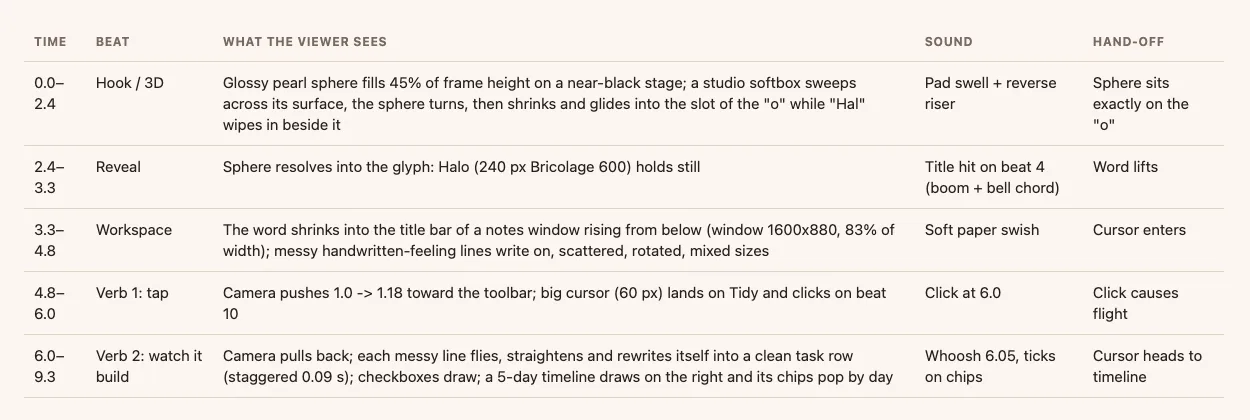
Part of our real beat table (BEATS.md). Make every scene grow out of the last
Ask for one carrier object that travels through the film. In ours, the 3D sphere becomes the 'o' in the logo, the logo becomes the app's title bar, the app becomes a recap tile, and the button's ring becomes the 'o' again on the end card.
Build with a cursor and real states
Ask Claude to build the product's screens in HTML and drive them with a visible cursor: click, drag, check. Every click should cause a visible change.
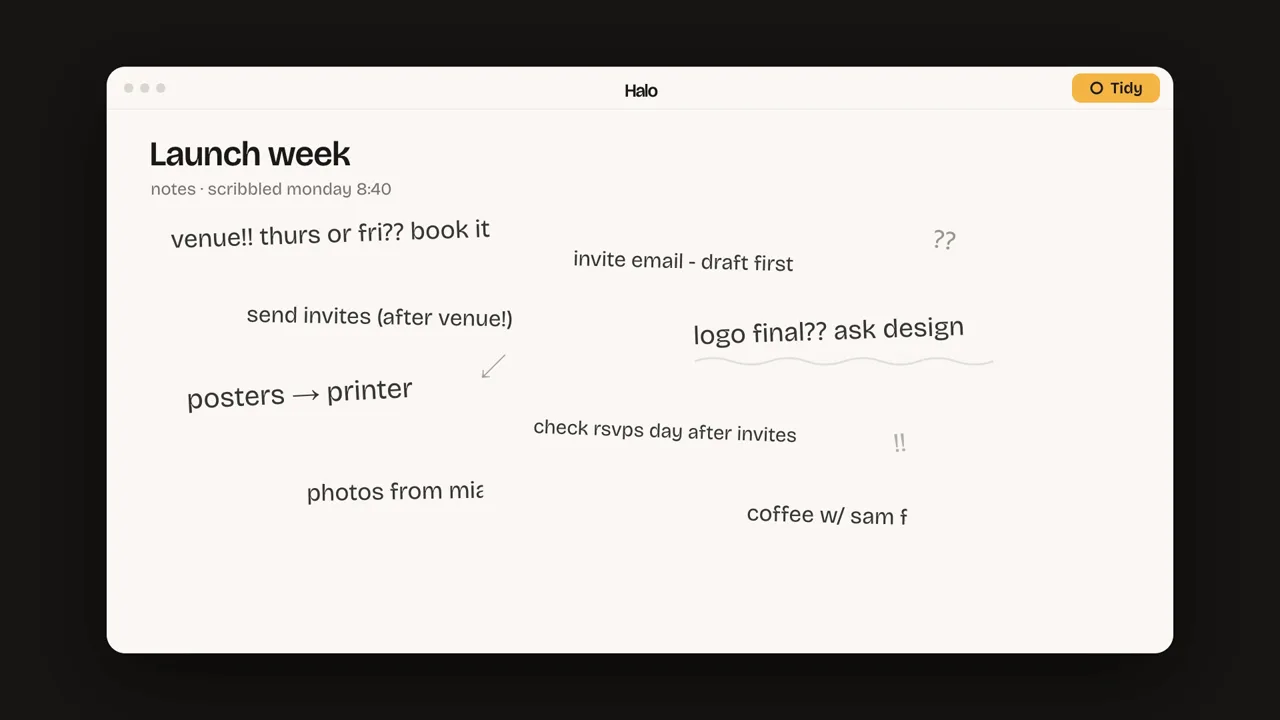
The cursor clicks Tidy and the messy notes become a plan. Check snapshots before rendering
Have Claude run the checker and look at snapshots. Our run needed 4 rounds: lines that didn't render, a sphere landing off-centre, a push-in cutting words, and low-contrast grey text.
npx hyperframes check npx hyperframes snapshot --at 1,3,6,11,17,22Add sound, then render
Generate original music and clicks locally (ours used a short numpy script), place hits on beats, then render.
npx hyperframes render -o launch.mp4
Prompts to copy
I want a [LENGTH]-second keynote-style launch film for [PRODUCT: one sentence]. Don't build anything yet. Write a beat table: time range, what the viewer sees (one idea per beat), the click or state change, the sound, and how it hands off to the next beat. One carrier object should travel through the whole film. End with a recap grid that reuses moments already shown, and an end card. Use only these facts: [FACTS].
Build the film in HyperFrames from the approved beat table: product screens in HTML, a visible cursor for every interaction, one short three.js opener, generous timing, near-black stage. Self-host the fonts. Check it and show me snapshots at each beat before rendering.
Write a small script that synthesizes an original music bed at [BPM] BPM plus soft UI clicks and a title hit, placed on the beat-table times. Mix to about -16 LUFS. No downloaded or third-party audio.
What you’ll get
A HyperFrames project with a beat table, editable scene files and a rendered MP4.
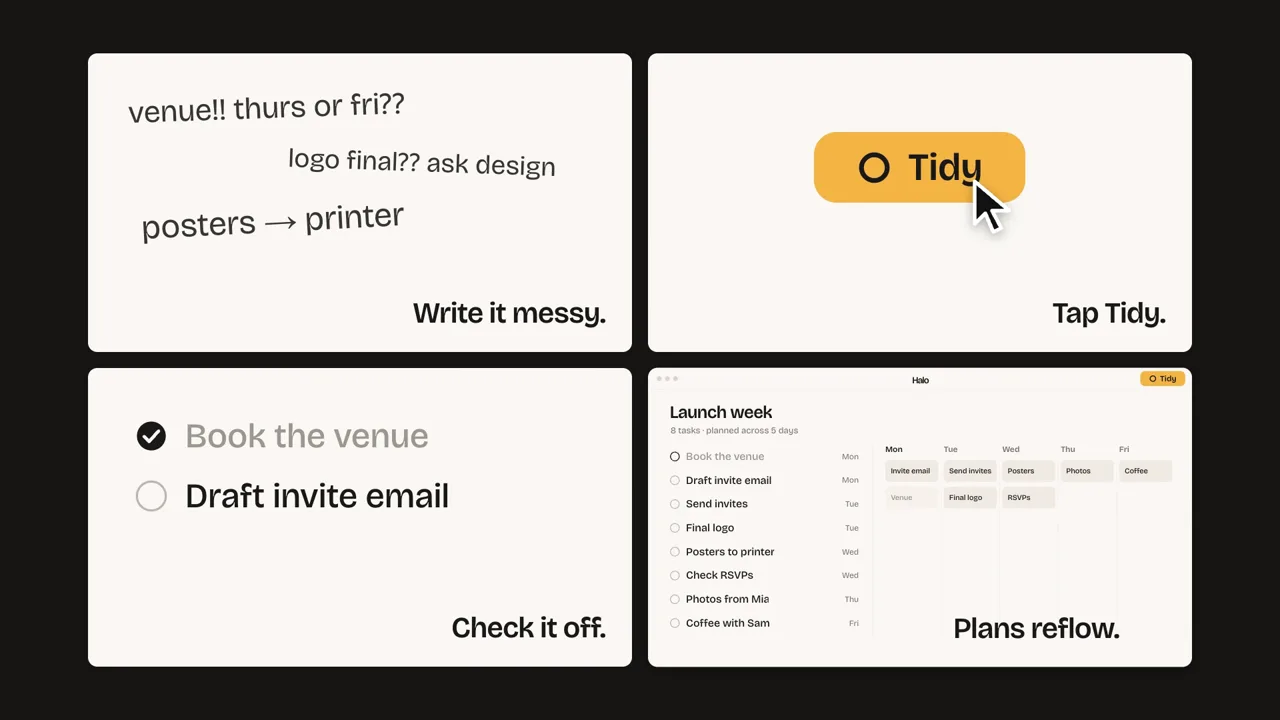
Our run on 17 Nov 2026 for a fictional product, Halo: about 25 minutes from empty folder to finished render, 4 revision rounds, a 24 s 1920×1080 film with synthesized audio at -16 LUFS. The render took about 10 minutes because the three.js scene forces screenshot capture.
If it doesn’t work
Rendering is very slow
UI text is unreadable in a vertical crop
It looks like a slideshow
The fine print
Limits
- Claude Code is a paid plan; long builds use more of your usage.
- Don't recreate a real company's product UI or logo for public use without permission. We used a fictional product.
- Synthesized audio is basic; licensed music can sound better.
Other ways to do it
- Use HyperFrames' Studio app instead of Claude Code (free plan available; see its docs).
- Start from a screen recording of your real product and animate only the titles and transitions.
Safety. Use only verified product claims. Mark spec or concept films as such.
Sources
Last tested 2026-11-17. Found something out of date? Tell Lana on Instagram and the guide gets fixed with a date.
Animate anything from one picture and one sentence
Animate anything else from one image: see the ANIMATE guide.
Open it
More like this.
ANIMATEAnimate anything from one picture and one sentence
Give Claude a style reference and a one-line idea; it draws every frame in code with HyperFrames and renders an MP4 on your computer.
 TASTE
The free skill that makes Claude check its own design
Install MotionSites Web Builder, give Claude one prompt, and watch it plan, build, screenshot and fix a landing page before you touch anything.